
StartProto Webhooks: How Manufacturers Log an Event and Update Every System
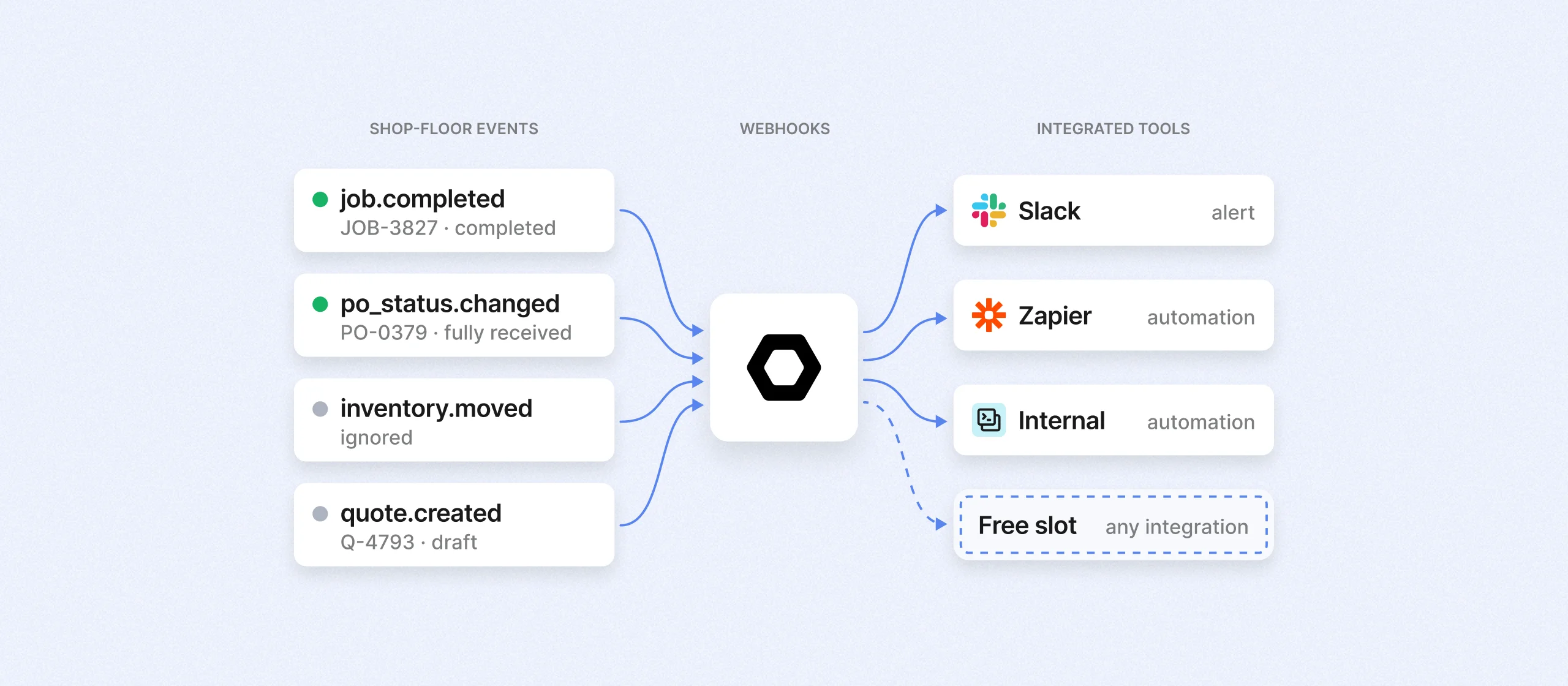
Manufacturing operations frequently waste time manually logging a single shop floor event across multiple software systems. StartProto webhooks solve this inefficiency by automatically pushing real time updates, such as completed machine operations, sales shipments, or material receipts, directly to connected external software the moment they occur.
Why One Event Gets Entered Four Times
An operator finishes a turning operation and logs it at the machine, and then the same piece of information gets entered three more times by three more people.
- Production control updates the scheduling boar
- Customer service emails the customer
- Purchasing releases the vendor PO for the next step
Each entry is another opportunity for data to be entered wrong. Until the last update is done, different parts of the business are working from different versions of the same job.
The usual response is to ask people to be more disciplined, which never holds for long because the problem was never discipline. The information only needed to be entered once, and everything after that was a person acting as a messenger between two pieces of software.
How StartProto Webhooks Work
A webhook is a message StartProto sends to another system the moment something changes, without that system having to ask. You tell StartProto which events matter and where each one goes, and it delivers them as they happen.
Most manufacturers who have connected systems before have done it the opposite way. For example, a sync that runs on a schedule and pushes yesterday's transactions into accounting at two in the morning. That holds up until timing matters, which in production it almost always does. For example, a shipment that leaves the dock at nine in the morning does not exist anywhere else in the business until the following day.
Top Three Use Cases for Webhooks in Manufacturing ERPs
The three events below are the ones manufacturers use webhooks for most. Each one solves a different kind of problem.
Case One: Operation Complete on a Constraint Work Center
When an operator closes out a turning operation, several people need to know and today most find out by asking. Production control needs the job marked clear of the lathe so the next work center can be staged. If the next step is outside processing, purchasing needs to release the vendor PO.
Nothing here is wrong in the data. It is simply late. Late is what left the machine idle waiting on a setup nobody knew to stage. Subscribing to the operation completion event has StartProto announce it the instant the operator logs it, so a message lands in the Slack channel for that work cell and the scheduling view refreshes on its own.
Case Two: Sales Order Shipped and the Invoicing Gap
An order that ships on Tuesday and gets invoiced the following Monday represents most of a week during which work you delivered that is not yet a receivable. Delayed cash flow across a month of orders adds up to a number worth caring about.
A webhook on the shipment event removes the dependency on memory. StartProto fires the moment shipping and receiving records the outbound, carrying the sales order, line items, quantity shipped, and tracking information. Accounting invoices against what actually left the building, the customer confirmation goes out with tracking attached, and the sales order closes in your CRM without anyone opening it.
Case Three: Purchase Order Received and the Jobs Waiting on It
Receiving logs material against a PO as it arrives. This single entry goes unnoticed and now a job is waiting on that material that could be released immediately and the buyer is still chasing a vendor who has already delivered the materials.
Nobody is late here on account of a slow process. They are late because the information never traveled. Subscribe to the receipt event and the purchase planning view clears the shortage, the production manager learns the job is no longer material-constrained, and buyer is aware their material arrived.
What to Confirm Before You Trust Automation
Endpoints go down for ordinary reasons. If a webhook fires into one that is not listening and nothing catches the failure, the event disappears without anyone noticing. That silence is what makes a broken automation worse than no automation.
Confirm three things for any event you subscribe to.
- Retry behavior: a failed delivery should be attempted again on a backoff rather than dropped.
- Repeatability on the receiving end: a retry arriving after the original already succeeded does not invoice the same shipment twice.
- Visibility: somebody needs to see failures in a delivery log rather than discover them at month end.
Choosing Which StartProto Events to Subscribe To
Subscribe to an event when somebody currently has to go tell somebody else that it happened, because that handoff is the manual work and eliminating it is the entire return. When an event fires and nothing downstream would happen differently, leave it alone.
Let’s be straight: the webhook is the easy half. Something on the other end has to receive it and act. Many modern, cloud systems have this capability. Also, a StartProto has a native integration with Zapier to help connect systems and pass webhooks. The real decision is rarely whether to use webhooks, but whether a particular downstream automation is worth building and maintaining.
PRO TIP: One caveat on constraint work centers. Subscribing to every operation on every job is the fastest way to build a notification channel your team learns to ignore.
Conclusion
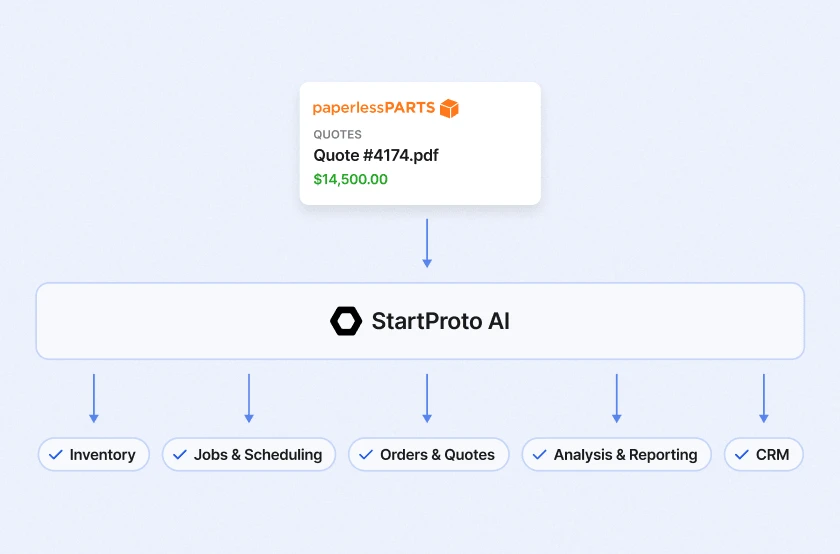
Webhooks are one part of how StartProto connects to the rest of your business, alongside the REST API, native integrations with modern tools like QuickBooks, PaperlessParts, and Fusion 360, and the MCP server that connects AI agents to production data.
Stop using people as the connective tissue between systems that should be talking directly. Begin with the events that touch cash, confirm it behaves when something fails, and add from there.
To see StartProto webhooks running against live production data, book a demo.

Unlock the potential of AI manufacturing
Blogs & Resources
Industry trends, manufacturing business tips, and more

Ready to get started?
We'll make it easy for you — pick the time that works best for you and we'll send an invite right to your calendar.