
The Problem With Entering Data Twice
To quote a part accurately you have to build most of the plan for making it. Your estimator works out the bill of materials, the routing, the material callouts and the run times, because that is where the price comes from.
When the order lands, someone types all of it into the ERP a second time. It is usually a different person working off a PDF with three other orders waiting. This second pass is where the most errors are introduced; router steps disappear and material specs drift. This is reason we built the Paperless Parts integration.
What Each System Does
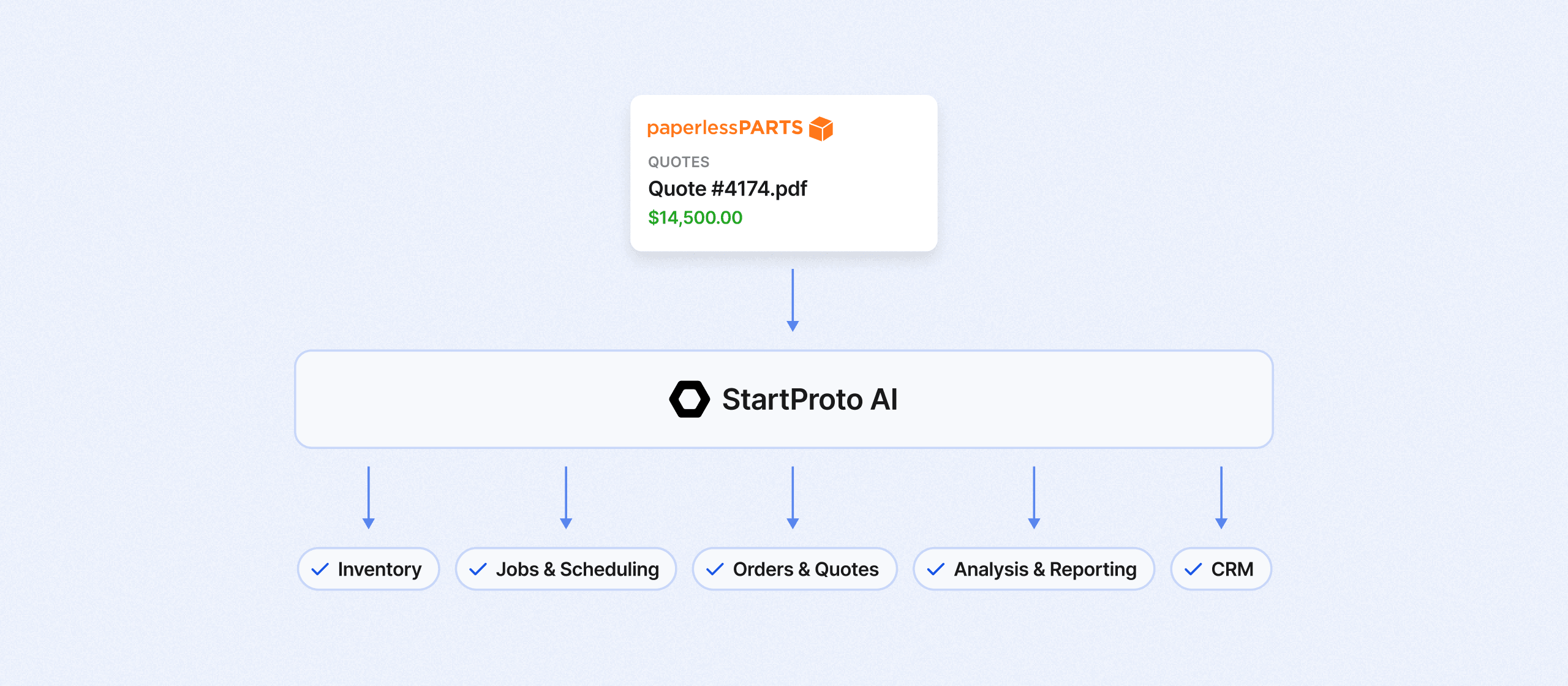
Paperless Parts is for quoting. It reads geometry off a 3D model, builds the BOM from it and runs your costing formulas against the features it finds, so estimators can get consistent prices out the door faster. Once the order is placed, Paperless Parts has done its part.
StartProto runs everything after that. The routing and BOM that priced the job becomes the plan behind jobs and scheduling, purchase planning, inventory, quality checks and shipping and receiving, and operators see their piece of it in the job interface.
Both systems store parts, materials, routers and customers, so any integration between them has to sort out who owns what.
NOTE: Paperless Parts talks about this integration, where exporting means moving data out of Paperless Parts and into StartProto, and importing means bringing StartProto data in. We will use the same terms as to remain consistent.
Who Owns What
Each type of data gets a single owner to avoid duplication. In a standard Paperless Parts ERP integration, the ERP owns most of them. Purchasing, production, shipping and accounting are in StartProto all day. Paperless Parts is normally just estimating and sales.
Paperless Parts owns quote costing. StartProto owns the BOMs and routing, the customer records, the buy items and vendor pricing, and the process and work center rates.
That split gives the integration two jobs.
- The first is to carry the BOM and router built during quoting into StartProto so nobody rebuilds it.
- The second is to keep StartProto data inside Paperless Parts current enough to drive costing automation while a quote is being drafted.
There is one exception to the ownership rules. Quoting happens first. A part or a customer often exists in Paperless Parts before it exists anywhere else. In this case, the Paperless Parts version gets copied into StartProto. After that StartProto owns it. This prevents a quote revision six weeks later cannot overwrite a routing your operators are already running.
Paperless Parts → StartProto
Data moves in this direction when the order is created. Drafting, sending and revising a quote changes nothing on the StartProto.
Once the order exists, StartProto builds an order record with the customer details and the money behind it: shipping address, payment terms, line item pricing, and order total. If the account is new to StartProto, it gets created. StartProto writes its own object ID into the ERP Code field in Paperless Parts so the two records stay linked.
StartProto then works through the line items. Any BOM and routing that does not already exist gets built from the Paperless Parts data.
From there the order behaves like every other order in the system. It enters the schedule against your current demand, generates purchasing suggestions for whatever the routing needs and inventory does not cover, and starts producing work for the floor without anyone retyping a thing.
StartProto → Paperless Parts
The other direction runs continuously. An event listener watches create and edit events on the relevant records in StartProto and pushes them over as they happen. There is no overnight batch to wait on. Estimators are always quoting against current costs.
Company records map to the matching account, contact and facility in Paperless Parts, linked by that same ERP Code field.
Process rates go to a custom table in Paperless Parts carrying the process name, the hourly costing rate, a link back to the record in StartProto and the StartProto object ID. A process in StartProto is the equivalent of an operation in Paperless Parts.
Raw materials work the same way. Sheets, bars, and rod stock each carry a name, a description, notes, the price of one purchasing unit from the default vendor, that vendor, the lead time set on the default buy option, the purchase link, the purchase unit, the purchase unit size and the consumption unit used in routings.
Hardware and other purchased components are different, because Paperless Parts has a first-class data model for them. Those map straight into it through configured columns, with the StartProto part number landing in oem_part_number and the StartProto object ID in internal_part_number.
All of these start life as Buy Items in StartProto, and a custom field on the record tells the integration whether the part is a material or a purchased component so it lands in the right place. Whoever maintains vendor pricing keeps doing it in one system and estimating inherits the result.
What Still Takes a Person
Two things stay manual, and both are setup work rather than daily work.
- Costing logic on a Paperless Parts operation has to be configured by hand and cannot be set through the API. A new process will show up in the custom table on its own, but someone in estimating has to finish it before that operation can carry a quote.
- There is also no historical backfill. Existing records go into Paperless Parts by CSV during onboarding and the live sync takes over from there.
Why We Built it This Way
Our founder built integrations at Paperless Parts before starting StartProto, and the spec behind this one is the same rubric he used there to decide whether a connector was ready for customers. You can see it in the details: identifiers get written back so records stay linked, an existing routing never gets overwritten, and every type of data has a named owner rather than syncing both ways and hoping.
Paperless Parts is one of several systems we connect to. Visit the integrations page, to see them all and the system overview covers how the pieces fit together.
Field-level mapping for this integration, including screenshots of a mapped order, BOM and company record, is documented in the knowledge base.
Conclusion
The work your estimator does to price a job is the same work your production team needs to run it. There is no good reason for anyone to do it twice.
This integration carries the BOM and router across the moment an order is created, keeps ownership of every record clear so nothing gets overwritten in the process, and feeds current rates and vendor pricing back into Paperless Parts so the next quote starts from real numbers.
The setup work is small and happens once. Everything after that is your team quoting and building instead of retyping.
If you want to see it running against your own orders, book a demo and we will walk you through the mapping end to end.

Unlock the potential of AI manufacturing
Blogs & Resources
Industry trends, manufacturing business tips, and more

Ready to get started?
We'll make it easy for you — pick the time that works best for you and we'll send an invite right to your calendar.